
Circular Statistics and Distribution Overlays
Source:vignettes/circular-statistics.Rmd
circular-statistics.RmdOverview
The main radiatR vignette covers the path from raw tracking files to a plotted set of headings. This vignette picks up from a heading data frame and shows the analysis layer:
-
Dispersion summaries —
circ_dispersion(),sector_summary() -
Parametric fits —
vonmises_fit(),wrappedcauchy_fit() -
Hypothesis tests —
test_uniformity(),test_mean_directions(),test_concentration(), all with multiple-comparison correction -
Correlation —
circ_cor()(circular-linear and circular-circular) -
Distribution overlays —
add_angle_rose(),add_vonmises_density(),add_wrappedcauchy_density(),add_circular_kde() -
Significance geometry —
add_critical_r()(Rayleigh / V-test circle) andadd_critical_v_line()(V-test boundary)
Every statistics function takes a data frame with a heading column in
radians (default name "heading") and returns a tidy data
frame, so the results drop straight into dplyr,
knitr::kable(), or further plotting.
A heading data frame
We derive one heading per trial from the bundled
cpunctatus dataset with the ring-crossing rule, then attach
each trial’s target half-width (arc) for grouping. This is
the same construction used in the main vignette.
data(cpunctatus)

hd <- derive_headings(cpunctatus, rule = "crossing",
                      circ0 = 0.2, circ1 = 0.4,
                      coords = "relative")
#> Warning: derive_headings(rule = 'crossing'): 25 of 251 headings (10.0%), from
#> 25 of 235 trials, are missing and are excluded from circular statistics.
#> Rule-based failures are often non-random and can bias results; inspect attr(x,
#> "missing_ids").
names(hd)[names(hd) == "id"] <- "trial_id"

# attach target half-width (arc) from the dataset, by trial
arc_map  <- unique(cpunctatus@data[, c("trial_id", "arc")])
hd       <- merge(hd, arc_map, by = "trial_id")
hd$arc   <- factor(hd$arc)

# keep trials with a defined crossing heading
hd <- hd[is.finite(hd$heading), , drop = FALSE]
head(hd[, c("trial_id", "arc", "heading")])
#>   trial_id arc   heading
#> 1   10_1_1  10 0.2777794
#> 2  10_10_1  10 3.0376774
#> 3  10_11_1  10 6.0710737
#> 4  10_12_1  10 2.2074837
#> 5  10_13_1  10 0.9322361
#> 6  10_14_1  10 4.7955587
The heading column is in radians, reference-relative (0
= toward the target). Everything below operates on that column.
If you only need a summary and not the heading frame itself,
circ_summary_headings() derives headings from the tracks
with a chosen rule and returns the circular summary in one call.
group_by = NULL pools all trials;
group_by = "id" (the default) gives one row per trial:
circ_summary_headings(cpunctatus, rule = "distal", group_by = NULL)
#>   mean_dir resultant_R      kappa   n group
#> 1 1.814938  0.04215183 0.08437866 235   all
Dispersion summaries
circ_dispersion() returns the mean direction, resultant
length R, and circular standard deviation. Grouping by
arc gives one row per condition.
circ_dispersion(hd, group_col = "arc")
#>   arc    mean_dir resultant_R   circ_sd  n
#> 1  10 1.980062802  0.25662879 1.6493178 35
#> 2  15 0.002875648  0.18589914 1.8344214 27
#> 3  20 2.960834000  0.07603959 2.2700225 24
#> 4  30 5.830185048  0.06016175 2.3709570 34
#> 5  40 0.075648794  0.64058845 0.9437882 19
#> 6   5 0.394217868  0.17579270 1.8646446 30
#> 7  50 6.109431857  0.44404605 1.2742268 24
#> 8   0 2.276557489  0.08000698 2.2475059 33
R runs from 0 (uniformly scattered) to 1 (all headings
identical); the circular SD moves the opposite way. For dense per-frame
heading series — gaze direction from a tethered subject, say —
sector_summary() bins the angles and reports dwell
proportions per sector:
sector_summary(hd, sectors = 8L)
#>        sector  mid_angle count proportion
#> 1 -158degrees -2.7488936    27 0.11946903
#> 2 -112degrees -1.9634954    18 0.07964602
#> 3  -68degrees -1.1780972    20 0.08849558
#> 4  -22degrees -0.3926991    42 0.18584071
#> 5   22degrees  0.3926991    45 0.19911504
#> 6   68degrees  1.1780972    13 0.05752212
#> 7  112degrees  1.9634954    35 0.15486726
#> 8  158degrees  2.7488936    26 0.11504425
Parametric fits
vonmises_fit() estimates the mean direction
and concentration
by maximum likelihood, with asymptotic standard errors and a confidence
interval on
:
vonmises_fit(hd, group_col = "arc")[, c("arc", "mu_deg", "kappa", "n")]
#>   arc      mu_deg     kappa  n
#> 1  10 113.4492417 0.5310863 35
#> 2  15   0.1647625 0.3784077 27
#> 3  20 169.6432921 0.1525210 24
#> 4  30 -25.9550030 0.1205419 34
#> 5  40   4.3343566 1.6868180 19
#> 6   5  22.5870200 0.3571578 30
#> 7  50  -9.9553394 0.9900343 24
#> 8   0 130.4371359 0.1605288 33
wrappedcauchy_fit() is the heavier-tailed alternative —
more robust when the data have outliers or weak directionality. Its
concentration
is bounded to
:
wrappedcauchy_fit(hd, group_col = "arc")[, c("arc", "mu_deg", "rho", "n")]
#>   arc     mu_deg        rho  n
#> 1  10 118.338958 0.25480084 35
#> 2  15   4.745037 0.27375349 27
#> 3  20 159.559101 0.09056095 24
#> 4  30 339.103222 0.08571126 34
#> 5  40   6.248322 0.75905693 19
#> 6   5  25.796263 0.15937039 30
#> 7  50 351.847489 0.68966189 24
#> 8   0 133.599471 0.08467292 33
Both return a row per group, so a quick merge() puts the
two concentration estimates side by side for comparison.
Hypothesis tests
Uniformity
test_uniformity() asks, per group, whether the headings
have any preferred direction. The Rayleigh test gives an exact
p-value; when testing many conditions at once, pass
p_adjust for a corrected p_value_adj column.
For multimodal or non-symmetric alternatives where Rayleigh has low
power, the hermans_rasson and pycke omnibus
tests (test = "hermans_rasson" /
test = "pycke") are more powerful, at the cost of a
Monte-Carlo p-value:
test_uniformity(hd, group_col = "arc", test = "rayleigh", p_adjust = "BH")
#>   arc  statistic     p_value  n     test p_value_adj
#> 1  10 0.25662879 0.099244958 35 rayleigh 0.264653222
#> 2  15 0.18589914 0.397036850 27 rayleigh 0.638463349
#> 3  20 0.07603959 0.872766166 24 rayleigh 0.885708681
#> 4  30 0.06016175 0.885708681 34 rayleigh 0.885708681
#> 5  40 0.64058845 0.000186684 19 rayleigh 0.001493472
#> 6   5 0.17579270 0.399039593 30 rayleigh 0.638463349
#> 7  50 0.44404605 0.007583494 24 rayleigh 0.030333977
#> 8   0 0.08000698 0.811900045 33 rayleigh 0.885708681
Equal mean directions
test_mean_directions() is the Watson-Williams test — the
circular analogue of a one-way ANOVA on the mean angle. The omnibus form
asks whether any group differs:
test_mean_directions(hd, group_col = "arc")
#>   n_groups statistic df1 df2     p_value            test
#> 1        8  8.230315   7 218 6.70879e-09 Watson-Williams
Set pairwise = TRUE for all pairwise comparisons;
p_adjust is strongly recommended here because the number of
comparisons grows quickly:
pw <- test_mean_directions(hd, group_col = "arc",
                           pairwise = TRUE, p_adjust = "holm")
head(pw[order(pw$p_value_adj), ])
#>    group1 group2 statistic df1 df2      p_value            test  p_value_adj
#> 14     20     30  68.71016   1  56 2.590906e-11 Watson-Williams 7.254536e-10
#> 22     30      0  45.35938   1  65 5.086470e-09 Watson-Williams 1.373347e-07
#> 6      10     50  31.92401   1  57 5.341214e-07 Watson-Williams 1.388716e-05
#> 4      10     40  24.34873   1  52 8.658990e-06 Watson-Williams 2.164747e-04
#> 1      10     15  16.68434   1  60 1.328071e-04 Watson-Williams 3.187369e-03
#> 13     15      0  16.32869   1  58 1.586887e-04 Watson-Williams 3.649841e-03
Equal concentrations
test_concentration() checks whether the groups are
equally concentrated (the circular analogue of a test for equal
variances), a key assumption behind the Watson-Williams test above:
test_concentration(hd, group_col = "arc")
#>   statistic df    p_value        test
#> 1  14.23259  7 0.04719587 equal.kappa
Model selection
circ_model_select() ranks five candidate distributions
by AICc – uniform, unimodal,
axial, unimodal_uniform (a directed mode over
a uniform background), and bimodal (an asymmetric two-mode
mixture) – and reports Akaike weights. It answers whether a heading
sample is best described as undirected, singly directed, axially
oriented, directed-with-scatter, or genuinely bimodal.
hd_ms <- derive_headings(cpunctatus, rule = "distal")
arc_map <- unique(cpunctatus@data[, c("trial_id", "arc")])
names(arc_map)[1] <- "id"
hd_ms <- merge(as.data.frame(hd_ms), arc_map, by = "id")
circ_model_select(hd_ms, group_col = "arc")
#>    arc            model  n k    logLik       AIC      AICc       BIC      dAICc
#> 1   10          uniform 29 0 -53.29843 106.59687 106.59687 106.59687  0.0000000
#> 3   10            axial 29 2 -51.50436 107.00871 107.47025 109.74330  0.8733814
#> 4   10 unimodal_uniform 29 3 -51.04300 108.08600 109.04600 112.18789  2.4491293
#> 2   10         unimodal 29 2 -53.15387 110.30775 110.76929 113.04234  4.1724154
#> 5   10          bimodal 29 5 -49.34376 108.68752 111.29622 115.52400  4.6993497
#> 11  15          uniform 30 0 -55.13631 110.27262 110.27262 110.27262  0.0000000
#> 41  15 unimodal_uniform 30 3 -51.82459 109.64918 110.57226 113.85277  0.2996343
#> 21  15         unimodal 30 2 -53.31094 110.62187 111.06632 113.42427  0.7936929
#> 31  15            axial 30 2 -53.79386 111.58773 112.03217 114.39012  1.7595485
#> 51  15          bimodal 30 5 -50.88927 111.77855 114.27855 118.78454  4.0059258
#> 12  20          uniform 27 0 -49.62268  99.24536  99.24536  99.24536  0.0000000
#> 32  20            axial 27 2 -47.74062  99.48124  99.98124 102.07291  0.7358736
#> 52  20          bimodal 27 5 -43.99541  97.99081 100.84796 104.47000  1.6025959
#> 22  20         unimodal 27 2 -49.47757 102.95513 103.45513 105.54681  4.2097721
#> 42  20 unimodal_uniform 27 3 -49.47757 104.95513 105.99861 108.84264  6.7532506
#> 13  30          uniform 37 0 -68.00145 136.00290 136.00290 136.00290  0.0000000
#> 33  30            axial 37 2 -66.94814 137.89628 138.24923 141.11812  2.2463222
#> 23  30         unimodal 37 2 -67.37960 138.75921 139.11215 141.98105  3.1092481
#> 53  30          bimodal 37 5 -63.72366 137.44733 139.38281 145.50192  3.3799106
#> 43  30 unimodal_uniform 37 3 -67.37961 140.75921 141.48648 145.59196  5.4835806
#> 44  40 unimodal_uniform 20 3 -27.62695  61.25391  62.75391  64.24111  0.0000000
#> 54  40          bimodal 20 5 -27.19870  64.39739  68.68311  69.37605  5.9291975
#> 14  40          uniform 20 0 -36.75754  73.51508  73.51508  73.51508 10.7611738
#> 34  40            axial 20 2 -36.25323  76.50646  77.21235  78.49793 14.4584376
#> 24  40         unimodal 20 2 -36.67200  77.34400  78.04988  79.33547 15.2959744
#> 15   5          uniform 31 0 -56.97419 113.94838 113.94838 113.94838  0.0000000
#> 55   5          bimodal 31 5 -51.14723 112.29447 114.69447 119.46440  0.7460906
#> 25   5         unimodal 31 2 -56.81408 117.62817 118.05674 120.49614  4.1083591
#> 35   5            axial 31 2 -56.97248 117.94497 118.37354 120.81294  4.4251616
#> 45   5 unimodal_uniform 31 3 -56.81349 119.62698 120.51587 123.92894  6.5674914
#> 16  50          uniform 26 0 -47.78480  95.56961  95.56961  95.56961  0.0000000
#> 46  50 unimodal_uniform 26 3 -44.93562  95.87123  96.96214  99.64552  1.3925323
#> 26  50         unimodal 26 2 -47.13245  98.26490  98.78664 100.78109  3.2170284
#> 36  50            axial 26 2 -47.50728  99.01456  99.53630 101.53075  3.9666892
#> 56  50          bimodal 26 5 -44.86639  99.73279 102.73279 106.02327  7.1631803
#> 37   0            axial 35 2 -61.26559 126.53118 126.90618 129.64188  0.0000000
#> 47   0 unimodal_uniform 35 3 -60.53792 127.07584 127.85004 131.74189  0.9438571
#> 17   0          uniform 35 0 -64.32570 128.65139 128.65139 128.65139  1.7452142
#> 27   0         unimodal 35 2 -62.35996 128.71991 129.09491 131.83061  2.1887313
#> 57   0          bimodal 35 5 -59.49074 128.98148 131.05045 136.75822  4.1442667
#>          weight
#> 1  0.4630456847
#> 3  0.2992068080
#> 4  0.1360824640
#> 2  0.0574904028
#> 5  0.0441746405
#> 11 0.3243473868
#> 41 0.2792194402
#> 21 0.2181032681
#> 31 0.1345641252
#> 51 0.0437657797
#> 12 0.4353638826
#> 32 0.3013418647
#> 52 0.1953678628
#> 22 0.0530532503
#> 42 0.0148731396
#> 13 0.5600667577
#> 33 0.1821617229
#> 23 0.1183246276
#> 53 0.1033478731
#> 43 0.0360990187
#> 44 0.9457263081
#> 54 0.0487816619
#> 14 0.0043551815
#> 34 0.0006857339
#> 24 0.0004511146
#> 15 0.5092330373
#> 55 0.3506752001
#> 25 0.0652826414
#> 35 0.0557192092
#> 45 0.0190899120
#> 16 0.5364612848
#> 46 0.2673953487
#> 26 0.1073914095
#> 36 0.0738214844
#> 56 0.0149304725
#> 37 0.3996279357
#> 47 0.2492871407
#> 17 0.1669888184
#> 27 0.1337762051
#> 57 0.0503199001
The five models mirror the Schnute-Groot family implemented by the
CircMLE package (Fitak & Johnsen 2017); radiatR fits them natively
(the two mixtures by numerical maximum likelihood) and uses
human-readable labels rather than the M1-M5
codes.
Circular correlation
circ_cor() measures the association between headings and
a covariate. With x_type = "linear" (the default) it
computes the circular-linear correlation — here, whether heading
direction is associated with the numeric target half-width:
hd$arc_num <- as.numeric(as.character(hd$arc))
circ_cor(hd, x_col = "arc_num", angle_col = "heading", x_type = "linear")
#>           r   n            type statistic df    p_value
#> 1 0.2175965 226 circular-linear   10.7007  2 0.00474648
The returned r is unsigned (association strength, 0–1);
the test statistic
is approximately
.
For two angular variables, pass x_type = "circular" to get
Fisher’s
.
Circular regression
Where circ_cor() measures the strength of an
association, circ_regression() models it: it fits
the Fisher–Lee circular–linear regression of a heading on one or more
linear covariates, via a formula interface over
circular::lm.circular(). To show that the fit recovers a
known effect, we simulate trajectories whose mean heading shifts with a
predictor — the per-condition mean_slope controls that
shift — and then fit the model back:
cond <- data.frame(condition = "demo", n_trials = 120, ref_mean = 0,
                   concentration_base = 12, mean_slope = 0.6,
                   predictor_mean = 0, predictor_sd = 1)
s   <- simulate_tracks(conditions = cond, n_points = 8, seed = 1)
reg <- s[!duplicated(s$trial_id), c("predictor", "final_heading")]
names(reg)[2] <- "heading"

fit <- circ_regression(reg, heading ~ predictor)
summary(fit)
#>        term  estimate         se statistic p_value  conf.low conf.high
#> 1 predictor 0.3281699 0.02007503  16.34717       0 0.2888236 0.3675163
The coefficient table recovers a positive,
significant slope for predictor, confirming the
simulated effect. Note the magnitude: the Fisher–Lee model links the
mean heading to the linear predictor through a
function, so the fitted slope is on that link scale and
is attenuated relative to the plain mean_slope used to
simulate. Interpret the sign and significance of the
coefficients directly, and use predict() to read the effect
back on the angular (heading) scale:
predict(fit, data.frame(predictor = c(-1, 0, 1)))
#> [1] 5.6202847 6.2544774 0.6054847
The predicted mean heading tracks the predictor — rotating with its value — exactly as the simulation set up.
The fitted relationship can be drawn straight onto the circular panel: each covariate value becomes a mean-direction arrow, colour-graded by the predictor, so you see the mean heading sweep as the covariate increases.
radiate(headings_frame(hd, heading, units = "radians")) +
  add_circ_mean(fitted_directions(fit, at = seq(-2, 2, length.out = 7)),
                colour_col = "predictor")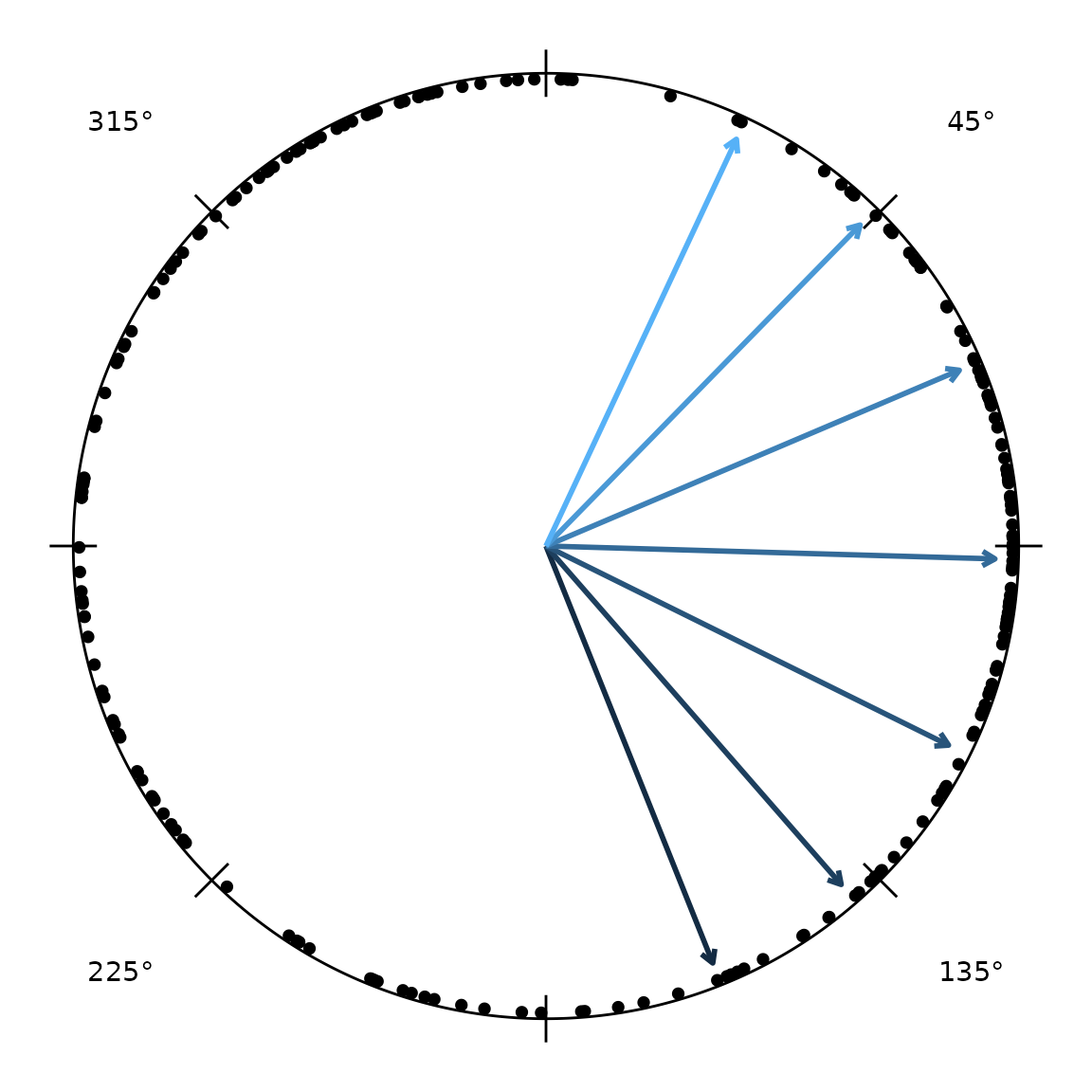
Distribution overlays
The overlay layers draw an angular distribution in the same Cartesian
unit-disc space as radiate(), so they compose onto a bare
circular canvas with +. We build that canvas once:
canvas <- ggplot() + coord_fixed() +
  add_circ(radius = 1) +
  theme_void()
A rose diagram bins the headings into wedges; the
parametric and non-parametric density curves overlay on top. Giving
every layer the same scale aligns their radii, so the
shapes can be compared directly:
vm <- vonmises_fit(hd)        # pooled fit (group_col = NULL)
wc <- wrappedcauchy_fit(hd)

canvas +
  add_angle_rose(hd, bins = 12, scale = 0.8, fill = "grey80") +
  add_circular_kde(hd, scale = 0.8, colour = "tomato") +
  add_vonmises_density(vm, scale = 0.8, colour = "steelblue") +
  add_wrappedcauchy_density(wc, scale = 0.8, colour = "darkorange")
The grey wedges are the empirical rose; the steelblue curve is the von Mises fit, darkorange the wrapped Cauchy, and tomato a circular kernel density estimate. Where the parametric curves track the rose closely the fit is good; a systematic gap (especially in the tails) is the cue to prefer the heavier-tailed wrapped Cauchy.
To show the individual headings rather than a
smoothed distribution, add_stacked_headings() fans
coincident headings into radial columns of dots, reducing the
overplotting of points stacked at the same angle. It needs a
headings_frame (the object derive_headings()
returns), so we use a fresh one here — hd above was demoted
to a plain data frame by the merge()/subset:
hd_frame <- derive_headings(cpunctatus, rule = "distal")
radiate(hd_frame, show_markers = FALSE) + add_stacked_headings(hd_frame)
step sets the gap between dots and
start_sep the inward offset of the first dot from the rim;
pass axial = TRUE to draw each datum at both poles.
Per-group overlays
Heading-summary overlays subdivide by a column to draw one element
per group, coloured by it – handy for comparing conditions on one plot.
The mean-direction arrow
(add_heading_arrow()) takes a colour_col; its
bootstrap confidence interval
(add_heading_interval()) takes a group_col.
Here both are split by target half-width (arc):
set.seed(1)  # the interval is bootstrapped
canvas +
  add_heading_arrow(hd,    colour_col = "arc") +
  add_heading_interval(hd, group_col  = "arc", stat = "bootstrap_ci")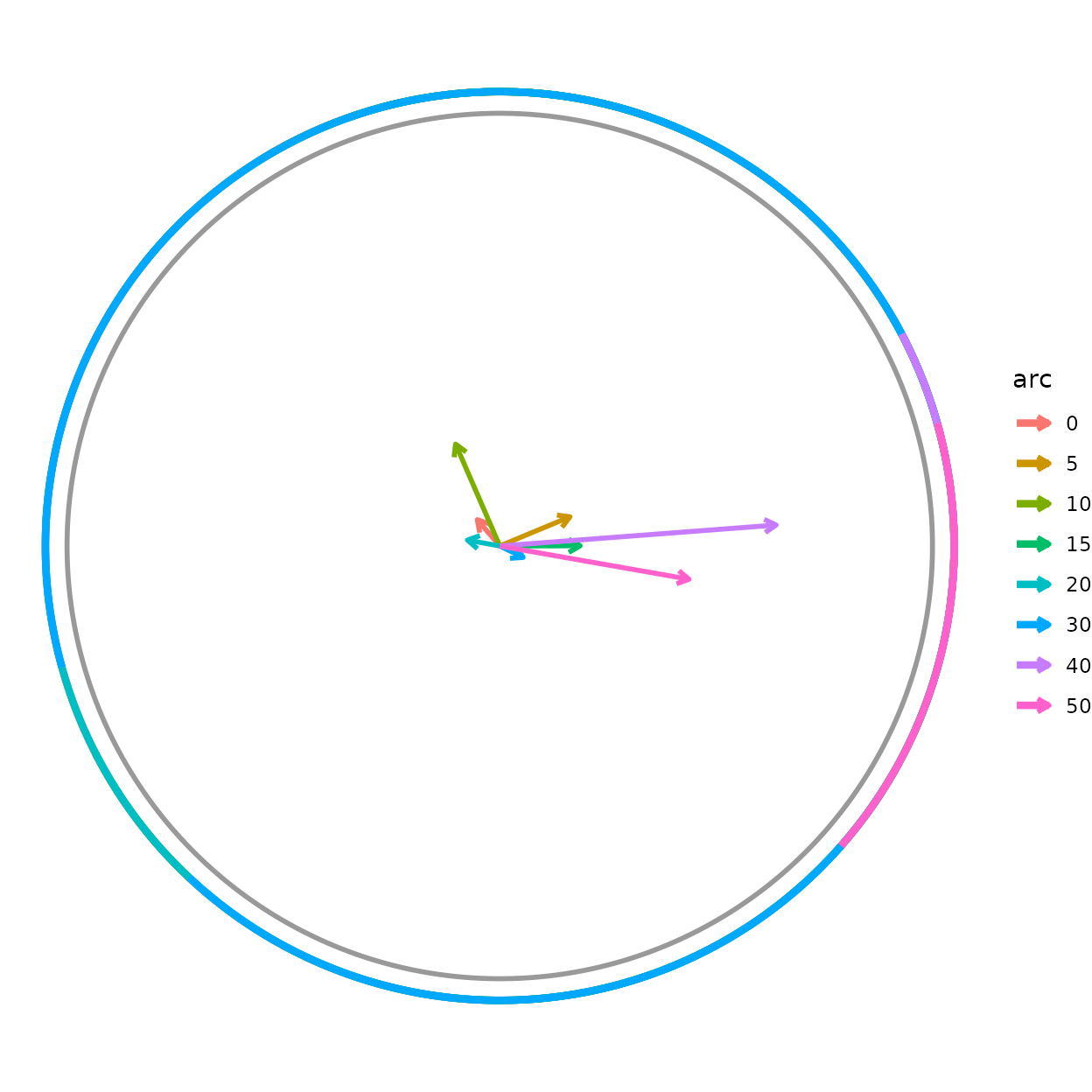
Each arc group gets its own mean vector and CI arc in a
matching colour. The grouping is independent of any faceting, so you can
(for example) colour by cohort while faceting radiate() by
treatment. radiate()’s own built-in arrow follows the same
idea via arrow_colour_col, drawing one arrow per group:
radiate(cpunctatus, group_col = "trial_id",
        show_arrow = TRUE, arrow_colour_col = "arc")
Significance geometry
The remaining two helpers draw the decision boundary of a significance test directly in resultant-length space (radius 0–1), so it can be read against the observed mean vector.
add_critical_r() draws the Rayleigh critical
circle: the mean resultant length needed for significance at
level alpha, namely
.
If the mean vector reaches past the circle, the headings are
significantly non-uniform.
disp <- circ_dispersion(hd)
mean_vec <- data.frame(x = disp$resultant_R * cos(disp$mean_dir),
                       y = disp$resultant_R * sin(disp$mean_dir))

canvas +
  add_critical_r(hd, alpha = 0.05, test = "rayleigh") +
  geom_segment(data = mean_vec,
               aes(x = 0, y = 0, xend = x, yend = y),
               arrow = arrow(length = unit(0.15, "inches")),
               linewidth = 1)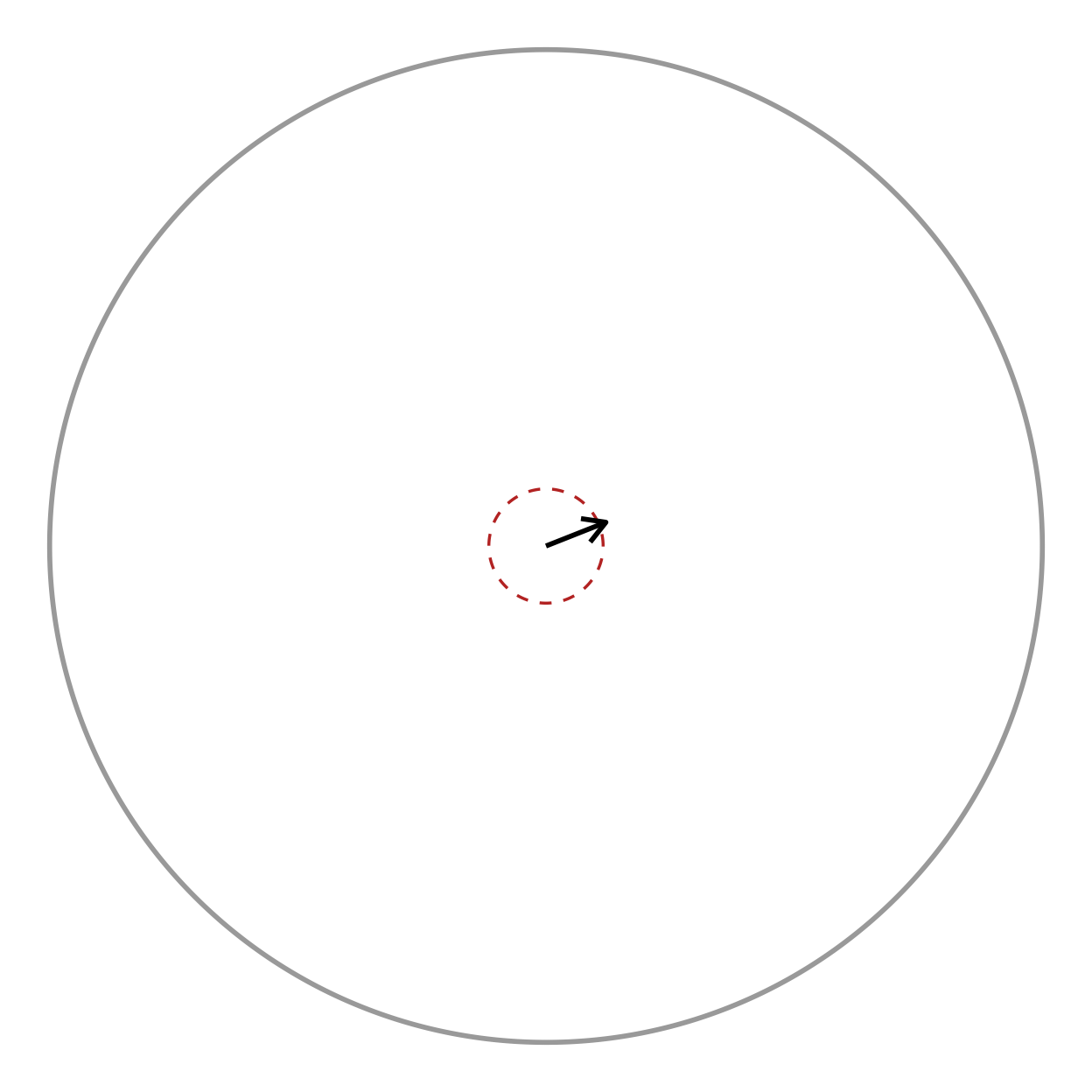
test_uniformity(hd, test = "rayleigh")
#>   statistic    p_value   n     test
#> 1 0.1298181 0.02217652 226 rayleigh
The arrow tip lies well outside the dashed critical circle, matching the tiny Rayleigh p-value above.
add_critical_v_line() is the corresponding boundary for
the V-test, which tests uniformity against a
specified direction mu0 (here 0, i.e. toward the
target). Unlike the Rayleigh circle, the V-test boundary is a straight
line perpendicular to mu0: significance requires the mean
vector’s projection onto mu0 to exceed
.
Set show_region = TRUE to shade the rejection side.
canvas +
  add_critical_v_line(hd, mu0 = 0, alpha = 0.05, show_region = TRUE) +
  geom_segment(data = mean_vec,
               aes(x = 0, y = 0, xend = x, yend = y),
               arrow = arrow(length = unit(0.15, "inches")),
               linewidth = 1)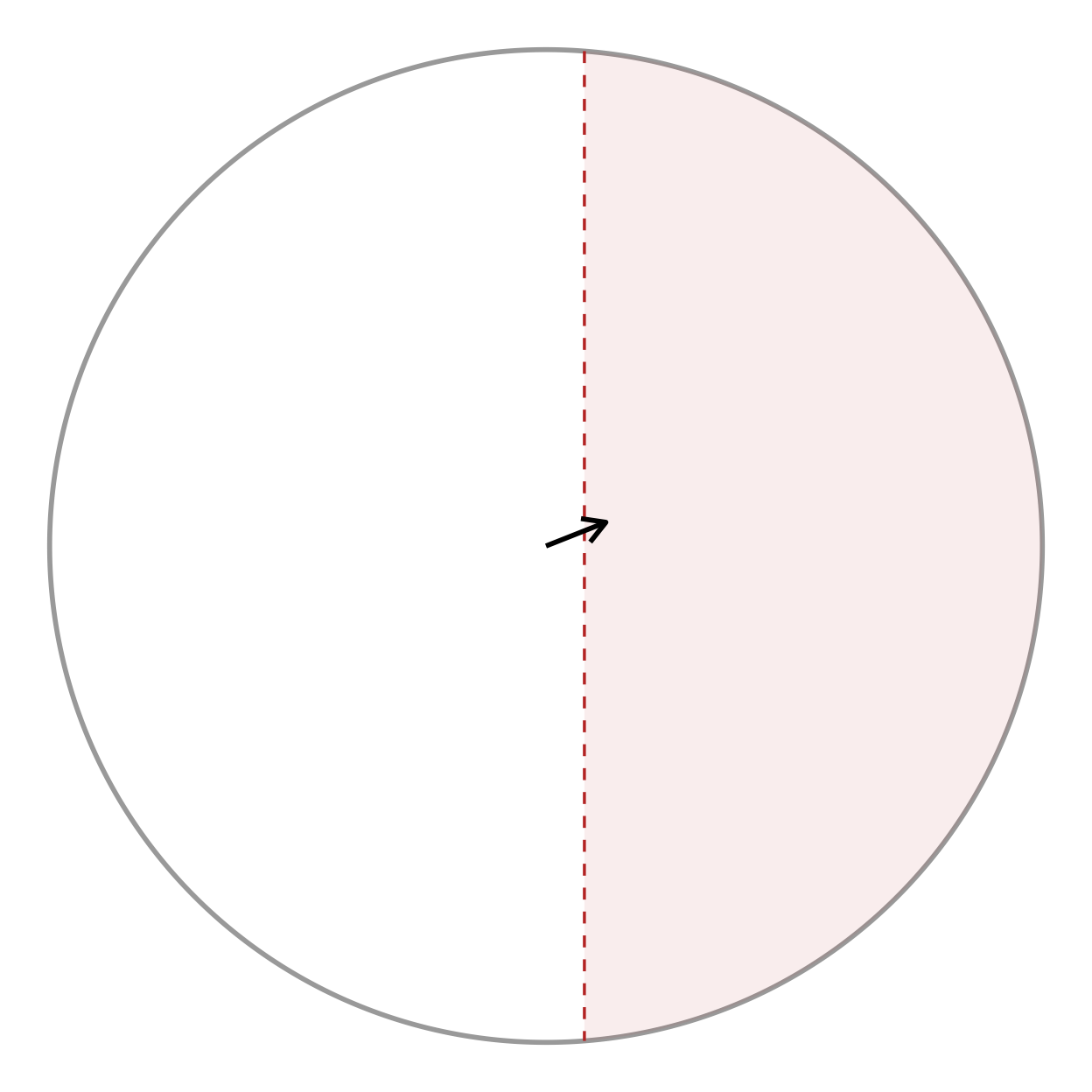
When the experiment has an a priori expected direction (the target), the V-test is more powerful than the omnibus Rayleigh test, and the line makes the one-sided nature of the decision visible.
Periodic data: time of day or year
Headings are not the only angles. Any periodic
variable — the time of day an event occurs (chronobiology), the day of
the year (phenology), or a generic cycle — maps onto the circle, and
then every tool above applies. as_angle() does the mapping
in the same clock/calendar convention as the circumference labels, so a
06:00 event lands on the "6" o’clock
label.
set.seed(1)
# 200 events: a strong morning cluster (~09:00) and a weaker evening one (~21:00)
times <- as.POSIXct("2020-06-01", tz = "UTC") +
  c(rnorm(150, 9 * 3600, 1.2 * 3600), rnorm(50, 21 * 3600, 3600))

events <- headings_frame(data.frame(heading = as_angle(times, "day")),
                         col = heading, units = "radians")

# is the timing non-uniform over the day?
test_uniformity(events, test = "rayleigh")
#>   statistic      p_value   n     test
#> 1 0.4789747 1.183343e-20 200 rayleigh

radiate(events, angle_labels = "hours")
The dots cluster at their clock positions, and the Rayleigh test
confirms the day is not uniform. Use period = "year" for
Date/POSIXct day-of-year data (pair it with
angle_labels = "months"), or a positive number for a custom
cycle length.
Where next
- The main vignette covers building these heading data frames and the trajectory/heading-overlay plotting layers.
- The Loaders vignette covers reading tracking-tool
exports into the
Tracksobjects these analyses start from. - Every function above is documented individually under Reference, grouped by role (summaries, parametric fitting, correlation, hypothesis tests, and distribution overlays). ```